⭕ Google Search Games · Hidden Games
Google Tic Tac Toe
Trick
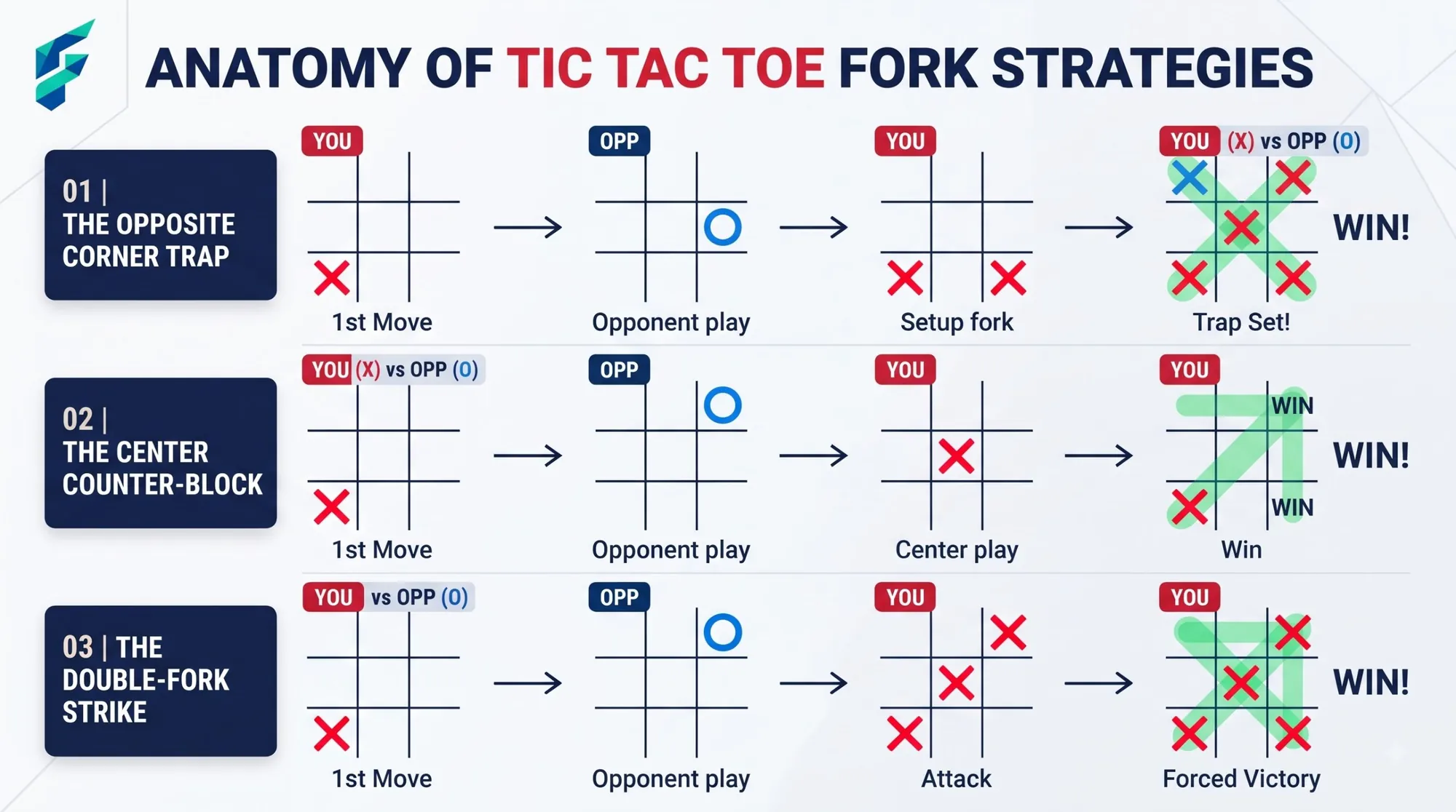
Tic-Tac-Toe looks too simple to deserve a guide, but Google's version is a surprisingly good way to learn how perfect play works. It sits on our hidden Google games list next to Solitaire, and it takes seconds to start. This guide covers how to launch it, what the three levels mean, and the short list of moves that guarantees you never lose.
Quick answer: Search for tic tac toe on Google. A game card appears. Pick X or O, choose Easy, Medium or Impossible, and play the computer or a friend.
Key takeaways
- Google added Tic-Tac-Toe to search on August 25, 2016.
- It has Easy, Medium and Impossible levels, and a friend mode.
- On Impossible, the best result is a draw, so aim not to lose.
How to start a game
- Search tic tac toe. The spelling tic-tac-toe also works, but one word without spaces did not for some reviewers.
- Pick your symbol. Choose X, who moves first, or O.
- Choose how to play. Pick a difficulty against the computer, or invite a friend to play on the same device.
- Click a square. The game responds right away.
The three difficulty levels
| Level | What to expect |
|---|---|
| Easy | The computer makes mistakes, so you can usually win. |
| Medium | A tougher opponent that still slips up sometimes. |
| Impossible | The computer plays perfectly, so the best you can do is draw. |
One search writer noted at launch that he could beat the game on the easier levels but could not beat Impossible, and that is by design. The game is also a neat early example among the classic games collected in our complete list of Google Easter eggs.
How to never lose
Tic-Tac-Toe is a solved game, which means correct play from both sides always ends in a draw. These rules keep you safe:
- If you move first as X: take a corner. If the computer does not answer in the centre, you can set up a fork, two ways to win at once.
- If you are O and X takes a corner: take the centre square.
- If you are O and X takes the centre: take a corner, not an edge.
- Always block. If the computer has two in a row, block the third square before doing anything else.
- Look for forks. Before you place a mark, check whether your next move creates two winning threats at once.
Common mistakes
The most frequent errors are taking an edge square too early and forgetting to block a diagonal. If you lose on Medium, replay the same opening and notice which threat you missed.
When you want something more chaotic than a draw, the Google gravity and underwater tricks guide breaks the whole page instead of a grid.
How we checked this: We used launch coverage from TechCrunch, TechRadar and Search Engine Journal for the features, and standard game theory for the strategy. Reports differed on whether a friend mode exists, and the majority of sources, including TechCrunch and TechRadar, said it does. Google can change the game without notice. Spotted something out of date? Email ownerflexora.ai@gmail.com and we will update the guide.
Your turn: Play three games as X on Medium and try to win at least one with a fork. Then switch to Impossible and see whether you can get a draw every time.
More hidden games to try
If you want something noisier, go back to where this series began with the Google Zerg Rush trick.
Frequently Asked Questions
For the original launch coverage, see TechRadar's report on the launch.