🚀 AI Tools · Startup Founders · Founder's Guide
AI Tools for Startup Founders:
The 2026 Playbook
The best AI tools for startup founders aren't the ones with the flashiest landing page — they're the ones still open in your browser three months in. Our own two-person team ran every task we could through a stack of AI tools to see which ones survived past the "wow, it wrote my whole pitch deck" moment. Some didn't make it past week two. A couple are still open in our browser tabs right now, as I write this.
That's the honest starting point for this guide. We talked to 10 founders between June and August — solo builders, two-person teams, one Series A company still running lean on ops — and asked the same question every time: which tools did you actually keep, and which ones did you quietly cancel after the free trial? The answers were more consistent than we expected.
Founders don't need a list of every AI product with a startup-shaped landing page. You need to know which ones are worth $20 or $29 a month when your runway is the thing you think about at 2am, and which ones are a $150/month mistake dressed up as a "co-founder in your pocket."
📍 What's inside: the stack by function (research, building, writing, outreach) · the stack by stage (idea, MVP, first customers) · three tools that earned a seat · what got cancelled and why · real cost math · guardrails to set early · a 60-day audit habit · and where to go next.
Why Founders Finally Standardized on a Stack
Two years ago, "AI for startups" mostly meant ChatGPT and a prayer. That changed for three reasons. First, purpose-built tools matured — Cursor for coding, Perplexity for cited research, Clay for outbound — each doing one job well instead of promising to do everything. Second, pricing dropped into founder-friendly territory: most of the tools that matter now sit between free and $30/month. Third, founders got burned enough times by generic "AI co-founder" products that the market quietly self-corrected toward tools that do one narrow thing exceptionally well.
The founders we talked to weren't chasing the newest tool. They were running the same three or four for months, occasionally swapping one out, and treating the rest of the noise as exactly that — noise. Before you shop for anything specific, it's worth reading our breakdown on how to choose the right AI tool, since half the founders we spoke to admitted their first purchase was the tool with the flashiest landing page, not the one that fit how they actually worked.
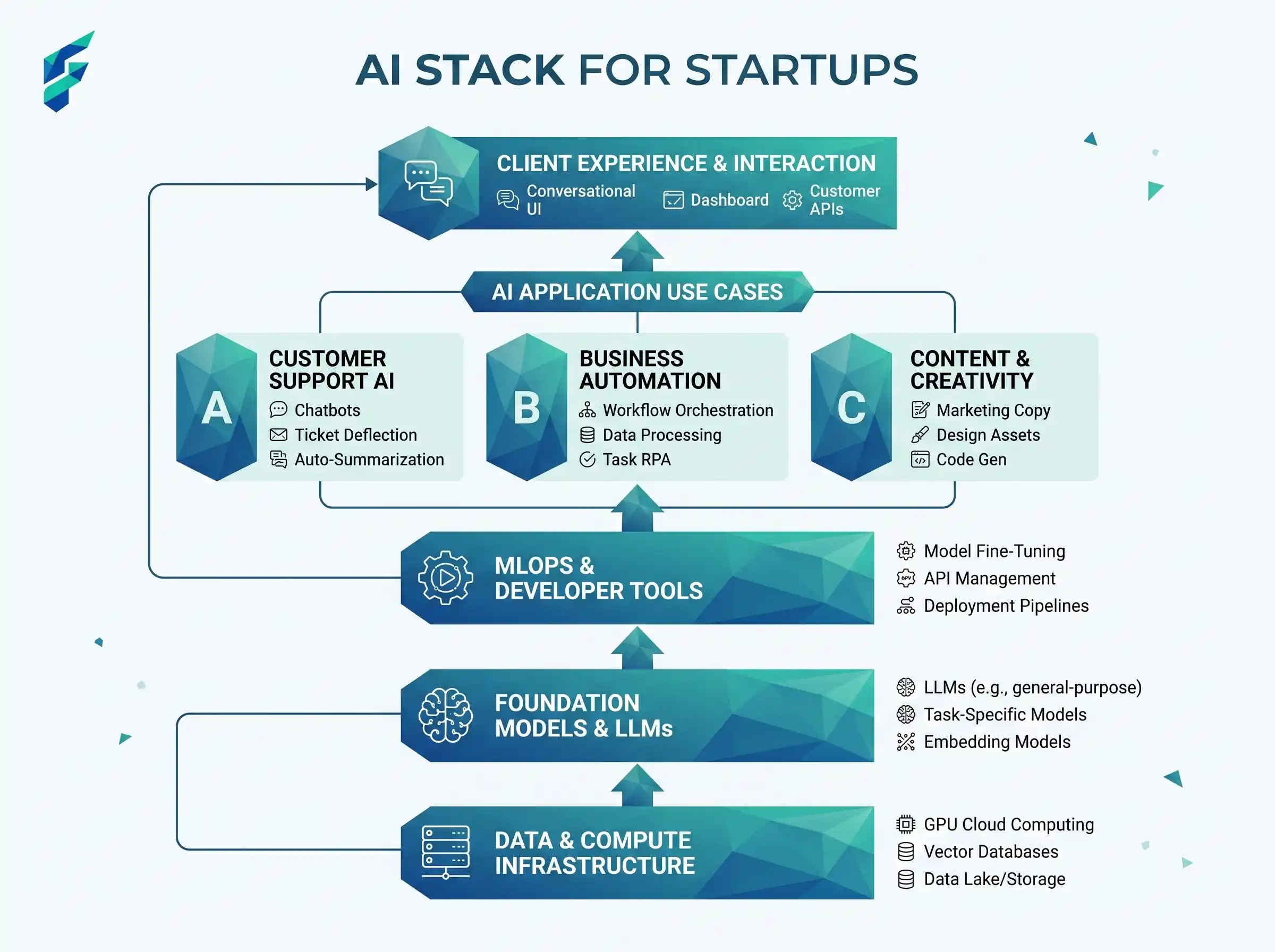
The 2026 AI Stack by Function
| Category | Best-Fit Tools | Typical Cost | Best For |
|---|---|---|---|
| Research & validation | Perplexity, ChatGPT, Claude | $0-$20/mo | Market sizing, competitor scans, cited facts |
| Building the product | Cursor, Claude Code, Lovable | $0-$20/mo | MVP builds, debugging, non-technical prototypes |
| Writing & internal ops | Notion AI, Grammarly, Upmetrics | $0-$20/mo | Investor updates, docs, business plans |
| Sales & outreach | Clay, HubSpot AI, Front | $0-$300+/mo | Outbound, lead scoring, shared inbox |
| Design & content | Canva AI, Runway ML | $0-$15/mo | Launch graphics, demo videos |
The pattern across every interview: founders run one tool per category — the one that's actually built around their real workflow. The founders who churned fastest were running two tools that did the same job, discovered only when a card statement showed up.
The Stack by Startup Stage
| Stage | Starting Stack | Monthly Budget |
|---|---|---|
| Idea / pre-validation | ChatGPT or Claude free tier + Perplexity | $0-$20 |
| Building the MVP | + Cursor or Lovable | $20-$60 |
| First customers | + Notion AI + HubSpot AI free tier | $60-$150 |
| Scaling outbound | + Clay + dedicated SDR tooling | $200-$500+ |
Three Tools That Earned Their Seat
1. Perplexity (research founders keep past month one)
We use this for anything that needs a citation attached — market sizing, "who else is doing this," pulling numbers for an investor deck. It shows its sources, which matters the moment someone on your cap table asks where a number came from. Pro is $20/month and paid for itself the first week we used it for real diligence instead of a dozen open Google tabs.
2. Cursor (the tool engineers would be most annoyed to lose)
An AI-native fork of VS Code. Our first MVP took roughly a third of the time it would have taken writing every line by hand, mostly from how fast it moves through boilerplate and refactors. $20/month, and every technical founder we spoke to had it open in a second monitor during the interview.
3. Claude (for the documents nobody wants to read twice)
Where we run longer material — a 40-page grant application, a messy customer-interview transcript, a contract we don't want to pay a lawyer $400 to skim first. The longer context window is the actual reason to reach for it over a shorter-context tool, not the branding.
✅ Key insight: Every founder we interviewed who narrowed down to one tool per function, instead of running two "just in case," reported fewer subscriptions and less context-switching within 30 days. Narrowing the stack was a bigger win than adding to it.
What Got Cancelled (And Why)
- A $100+/month "AI co-founder" tool with no free trial — a red flag before you've proven the workflow, not after.
- A second research tool bought at a conference — overlapped 90% with Perplexity, wasted a full quarter of budget before anyone noticed.
- An AI outreach tool that let the model send emails unedited — one founder had a prospect reply asking why the pricing in the email didn't match the website. Now every AI-drafted email gets a human read before it sends.
- A no-code builder used past the MVP stage — great for a testable prototype, a liability once paying customers needed a real engineering foundation underneath it.
⚠️ Data reality: Check what happens to customer or user data before you paste it into any AI tool, especially ones handling emails, support tickets, or contracts. A confident-sounding market size estimate is still a guess — cross-check anything that changes a real spending decision.
The Cost Math Founders Actually Use
A two-person B2B SaaS team we spoke to shared their month-three numbers:
- Stack cost: $80/month (Perplexity Pro + Cursor + Notion AI).
- Hours saved weekly: roughly 14, mostly on research and first-draft code.
- Freelancer cost avoided: they'd previously paid a contractor $900/month for market research alone.
- Net saving: ≈ $820/month, even before counting the engineering time saved.
The founder told us the real win wasn't the dollar figure — it was not having to wait three days for a contractor's turnaround when a decision needed to happen that afternoon.
How to Build Your Stack Without Overspending
Step 1: Cover One Tool Per Category First
Research, writing, building, outreach. Pick one tool per category before you add a second. We made this exact mistake ourselves — running two research tools side by side for a month, same output, double the subscription cost, and neither of us noticed until the statement showed up.
Step 2: Weight Spend Toward What You Do Daily
A technical founder should spend more on Cursor or Claude Code than on Clay. A sales-led founder should flip that. Don't buy the "complete" stack — buy the stack that matches how your week actually breaks down.
Step 3: Set a 60-Day Review
Put a recurring reminder on your calendar to check which tools you actually opened in the last two months. Cancel anything you didn't. This sounds obvious and almost nobody does it — we didn't, for the first four months we were operating.
💡 If you're solo: the calculus shifts — you'll lean harder on tools that replace a hire rather than tools that speed up a team. Our guide to AI tools for solopreneurs is worth reading if that's closer to your situation.
Guardrails Worth Setting Early
- Human review on anything customer-facing. Pitch copy, outbound emails, and support replies get a human pass before they ship.
- No sensitive data in tools without a clear data policy. Read the fine print before pasting a contract, cap table, or customer list into a chat window.
- Treat AI output as a first draft, not ground truth. Cross-check market sizing and competitive claims against real conversations before you act on them.
- One owner per tool. Someone on the team should be responsible for knowing what each subscription does and whether it's still earning its cost.
When Tools Stop Being Enough
AI tools compress the time research, drafting, and first-pass coding take. They don't replace judgment, domain relationships, or the accountability a real co-founder or early hire brings to the table. Most of the founders we spoke to hit a point — usually somewhere after their first 10-20 customers — where the questions got specific enough that no amount of AI research substituted for someone who'd actually worked the problem before.
That's also roughly when outreach tooling starts to matter more. If you're past the "will anyone buy this" stage and into repeatable sales motion, our guide on AI automation tools for small business covers the wider ops stack — CRM, email sequencing, invoicing — that most founders end up needing alongside the founder-specific tools in this guide.
Budget-Tight? Start Here
If cash is the real constraint right now — and for most pre-seed founders it is — a surprising number of these tools have usable free tiers that cover most of what you need in month one. Our full roundup of free AI tools for small business is worth bookmarking before you pay for anything, and our broader guide on how to automate small business tasks with AI covers the email, scheduling, and invoicing side once you're past the founder-tools stage.