📅 Staff Scheduling · AI Tools · Small Business
AI Staff Scheduling Tools
for Small Business
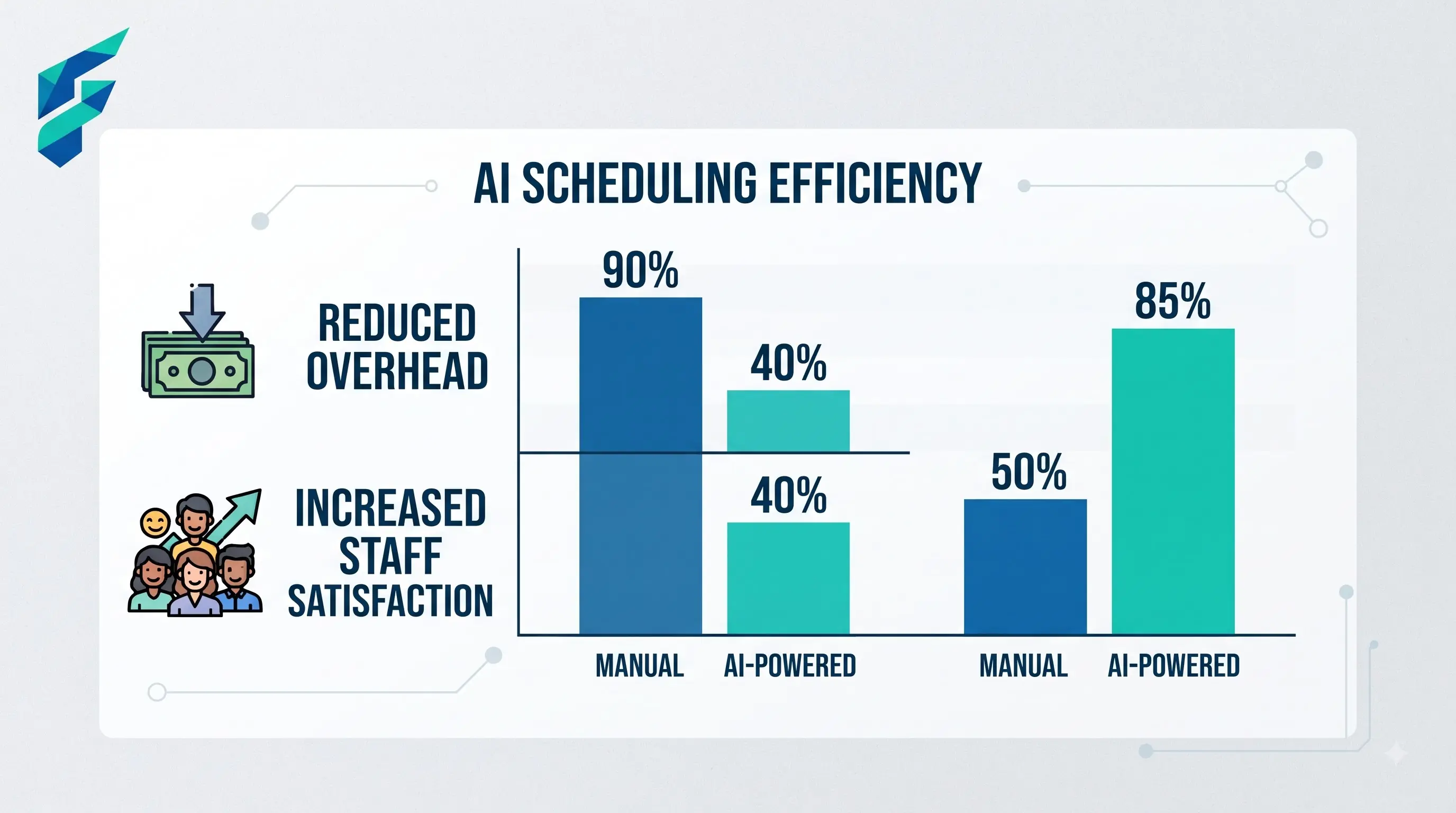
Scheduling breaks down in the same place for almost every small business: not the initial schedule, but the shift swaps, call-outs, and last-minute changes that come after. That's specifically the part AI scheduling tools are built to handle — not just building a schedule, but adjusting it without you personally fielding every "can someone cover me Thursday" text.
📍 Quick answer: If you're managing a handful of employees with fairly stable shifts, a spreadsheet or a basic scheduling app is genuinely fine — don't overbuy. AI scheduling tools earn their cost once you're juggling availability constraints across ten or more people, dealing with frequent shift swaps, or scheduling across multiple locations.
What AI actually adds over a basic scheduling app
Auto-filling shifts around real constraints
Feed it everyone's availability, any skill requirements (who's certified to work the register, who's trained on the espresso machine), and labor budget limits, and it builds a draft schedule automatically instead of you manually puzzle-piecing it together every week. Just like how AI summarization tools process complex documents into key takeaways, scheduling AI processes complex availability matrices into a clean, compliant draft.
Handling swap requests without you in the middle
An employee requests a swap, the tool checks who's available and qualified to cover, and either auto-approves or flags it for a quick yes/no from you — instead of a group text chain you have to referee.
Flagging overtime and compliance issues before they happen
Good scheduling tools warn you before a shift pattern triggers overtime pay or violates a break requirement, catching the cost before it hits your payroll rather than after. This proactive cost control ties directly into the broader financial health we discuss in our guide on AI financial forecasting tools for small business.
I used to spend 3-4 hours every Sunday manually cross-referencing availability, skill levels, and labor budgets in a spreadsheet, only to spend another 2 hours during the week refereeing shift-swap text chains. The initial setup of an AI tool took an afternoon, but it gave those 6 hours back to me every single week.

Where it doesn't help
- Very small, stable teams. If you've got three employees with the same shifts every week, an AI scheduling tool is solving a problem you don't have. The setup time isn't worth it.
- Teams that don't actually follow the schedule. If your team is used to informal, text-based coordination and won't adopt a new tool, the best scheduling software in the world doesn't help. Adoption is the actual bottleneck, not the software. Sometimes, introducing a simple AI chatbot for internal FAQs can help onboard staff to new digital tools before rolling out complex scheduling software.
What to check before picking one
- Does it integrate with your payroll system? A scheduling tool that doesn't talk to payroll means you're manually re-entering hours anyway, which kills most of the time savings.
- Can employees use it from their phone without an app download hassle? Adoption dies fast if the tool is annoying for hourly staff to actually use day-to-day.
- Does it handle your specific compliance needs? Break laws and overtime rules vary by state and industry — check that the tool's compliance flagging actually covers where you operate, not just a generic federal baseline.
Last year, a well-meaning manager accidentally scheduled a junior employee for the opening shift three days in a row without realizing it triggered automatic overtime under our state's labor laws. A good AI tool would have flashed a red compliance warning before that schedule was ever published, saving us hundreds of dollars in unexpected payroll.
Before investing in dedicated software, some teams start by building a structured template in tools like Notion to map out their constraints and availability, though this still requires manual updating and lacks the automated swap-handling of true scheduling platforms.
Comparing your options
| Tool type | Best for | Typical cost | Handles shift swaps automatically | Payroll integration |
|---|---|---|---|---|
| Basic scheduling app (no AI) | Small, stable teams | $0-20/mo | Manual approval | Sometimes |
| AI-assisted scheduling platforms | 10+ employees, frequent swaps, multiple locations | $2-6/employee/mo | Yes, with configurable rules | Usually, check specific tool |
| Spreadsheet | Very small teams, simple shifts | $0 | No | No |
The realistic payoff
Most small businesses that switch to an AI-assisted scheduler report the time savings showing up in swap handling, not the initial schedule build — the first draft schedule takes about the same time either way. It's the ongoing churn that AI actually removes from your week.
Since switching to an AI-assisted scheduler, the initial draft still takes about 20 minutes, but the weekly swap-refereeing has dropped to near zero. If you're ready to stop being the middleman for shift changes, check our Tool Finder filtered for staff scheduling platforms to find the right fit for your team size.