🚀 AI Blogging · SEO · Image Optimization
AI Tools for Blog SEO Images
2026 Comparison Guide

Custom blog imagery used to mean a stock photo subscription or hours in a design tool. Now it's a prompt and a few seconds. The tradeoff nobody mentions up front: an unoptimized AI image can quietly tank the exact page speed metrics search engines use to rank the post it's sitting on.
Does it help or hurt?
AI image tools help blog SEO when the images are genuinely relevant to the surrounding text, properly compressed, and given real alt text and file names — all things that feed into how a page is understood and ranked. They hurt blog SEO when large, unoptimized files slow the page down, or when images are generic and add nothing a reader or search engine can actually use.
What these tools actually need from you
A generator is only as good as the brief. Give it a vague prompt like "blog header for marketing article," and you get generic imagery that could sit atop a thousand other posts. Give it something specific to your actual article — the exact concept, tool, or process you're writing about — and you get an image that reinforces what the post is actually saying.
For example, when I needed a header for an article about "automating invoice extraction with AI," a generic prompt like "finance AI" gave me a glowing brain over a spreadsheet. But prompting "isometric 3D illustration of an AI scanning a paper invoice and extracting data into a clean digital dashboard" produced a custom, highly relevant graphic that perfectly matched the post's core concept.
The page-speed problem
Generate images at full resolution and drop them straight into a post without compressing them, and you'll notice it eventually: page load times creep up, and Core Web Vitals scores drop, both of which search engines factor directly into ranking.
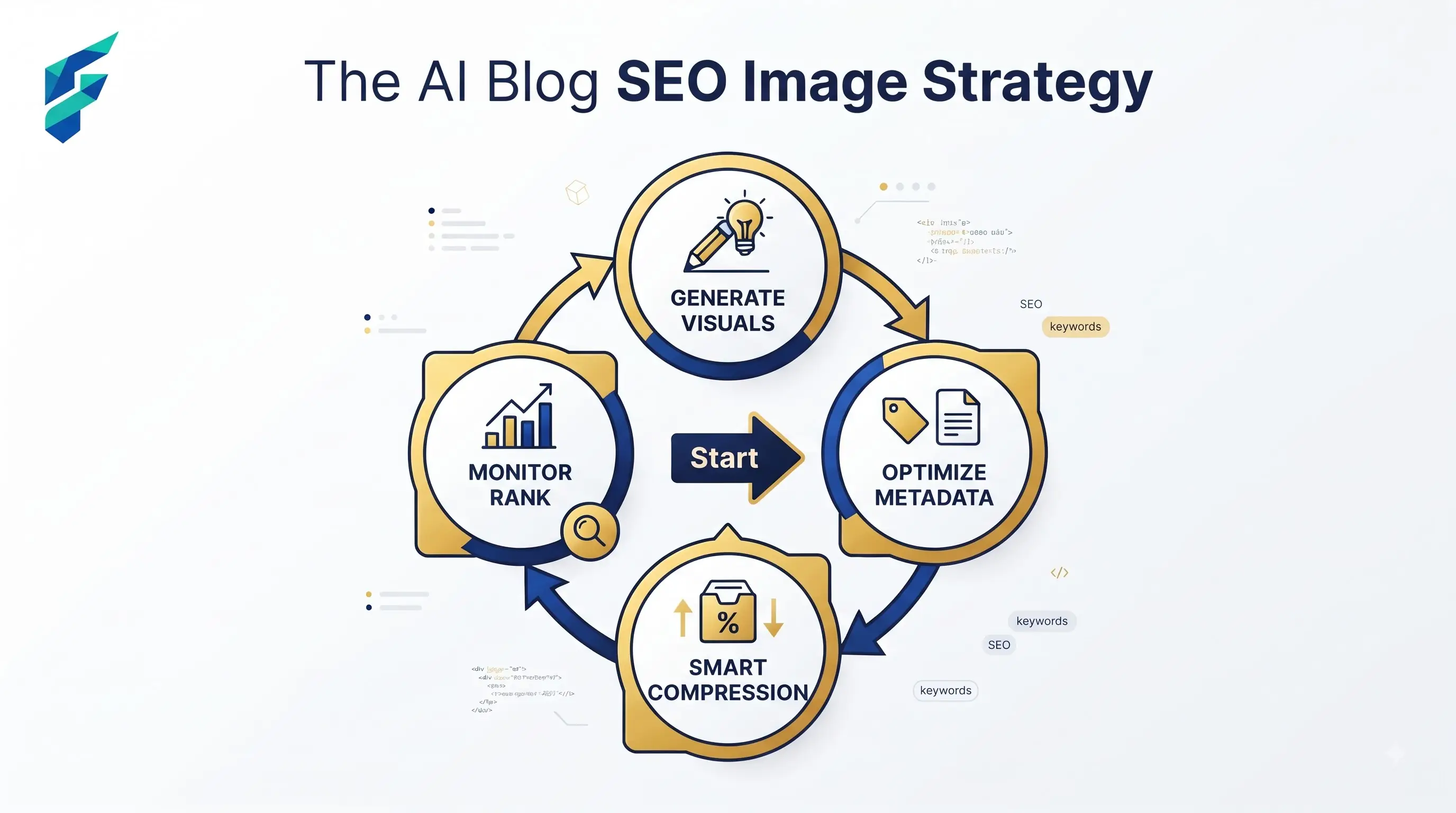
How to avoid it: compress every generated image before upload and give it a descriptive file name and alt text tied to the post's actual keyword, not a generic label. This ties directly into how a blog post ranks with AI tools more broadly — images are one input among several, not a standalone fix.
Where accuracy actually matters
An AI-generated image illustrating a process, chart, or comparison can look convincing while representing something inaccurately — a diagram with steps in the wrong order, a "chart" with numbers that aren't based on real data. For anything instructional, have a human confirm the image actually matches what the surrounding text claims.
I once generated a flowchart for a post about "customer onboarding steps" using an AI tool. It looked incredibly professional, but when I checked the actual steps, the AI had hallucinated a "credit check" step that my software didn't actually perform. If I had published that, readers would have been confused and support tickets would have spiked.
Format and technical considerations specific to this use case
Beyond file size, format matters — modern formats like WebP compress significantly better than JPEG or PNG at similar visual quality, and serving the wrong format is one of the most common, easiest-to-fix speed issues on image-heavy blogs.
Where these tools genuinely save meaningful time
Blogs publishing frequently — several posts a week, each needing a header and a few supporting images — benefit most, since custom imagery at that pace would otherwise mean either an ongoing stock photo subscription or a lot of hours in a design tool. This fits naturally alongside a broader AI blogging toolkit, where image generation is one piece of a bigger publishing workflow.
Comparing your options
| Approach | Best for | Typical cost | Risk of hurting page speed | SEO relevance risk |
|---|---|---|---|---|
| AI image generator, unoptimized | Fast drafts, internal use, quick previews | Free–low cost | High, if uploaded at full resolution | Moderate — depends on prompt specificity |
| AI image generator + manual compression step | Regular blog publishing at moderate volume | Free–low cost | Low, if compression is applied every time | Lower, with specific prompts |
| Automated pipeline (generate + compress + alt-text) | High-frequency publishing, teams with a content calendar | Low–moderate cost | Lowest | Lowest, if the workflow enforces specificity |
Check speed after you publish
Run every generated image through a compression step and check the page's load time after publishing — not just how the image looks in the editor, which never reflects real-world load conditions on a visitor's actual connection.
My workflow: generate the image with a highly specific prompt, run it through an automated WebP converter that caps the file size at 80KB, rename the file to match the target keyword (e.g., ai-blog-seo-workflow.webp), and add descriptive alt text before hitting publish. If you need help finding the right generator or compressor to start this process, check our Tool Finder filtered for SEO and image tools.