⏱️ Google Search Tricks · Useful Tools
Google Timer and Stopwatch
Trick
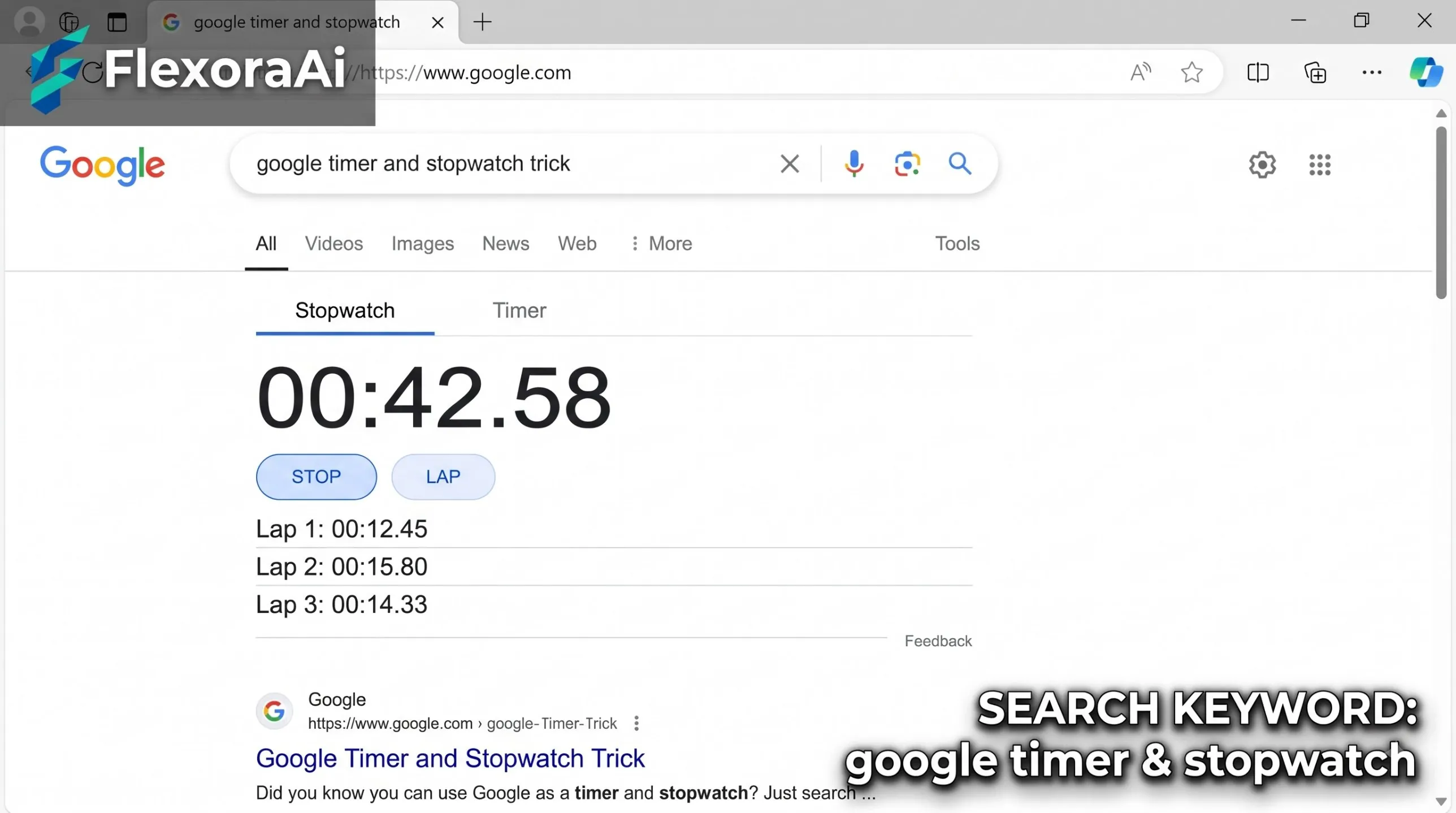
Your phone has a clock app, but it's three taps away and you're elbow-deep in dough. Google has a quicker route: type what you need and it starts. Timer and stopwatch are among the most-used entries in our Google search tricks list, and they've had a recent upgrade. Here's how to use them well.
Short answer: Search for timer or type timer for 10 minutes and Google starts counting down. Search for stopwatch to count up. The two tools share one interface, and Google redesigned them in August 2024.
Worth knowing
- You can type the duration straight into the search box.
- Timer and stopwatch share one interface.
- A redesign in August 2024 made them clearer.
Commands that work
| Type this | What happens |
|---|---|
| timer | Opens the timer, with the stopwatch a click away |
| timer for 10 minutes | Starts a 10-minute countdown |
| stopwatch | Opens the stopwatch |
| stopwatch for 3 minutes | Opens a stopwatch for that time, as reported by guides |
How to use them
- Open Google in your browser.
- Type timer for 10 minutes, or just timer.
- Press Enter. The countdown starts.
- Switch to the stopwatch tab if you need to count up.
- Wait for the alert when the timer ends.
What changed in 2024
In August 2024 Google gave the web timer and stopwatch a visual redesign. The tools looked cleaner and were easier to read at a glance, joining the other built-in tools like the metronome, the bubble level and the color picker. Reports at the time noted that they're available on mobile but make the most sense on desktop.
Small upgrades like this are why our complete list of Google Easter eggs keeps growing.
Ways to use them well
- Cooking. Set the timer for each stage instead of watching the clock.
- Study sprints. Work in 25-minute blocks, then take a short break.
- Workouts. Use the stopwatch for intervals and rest periods.
- Meetings. A visible countdown keeps talks on time.
When to use your clock app
A browser tab can be closed by accident, and some tools have reportedly been unavailable for short periods. For anything that matters, such as medication reminders, use your phone's clock app, which keeps running in the background and survives a closed tab.
Tips
- Keep the tab pinned. It's harder to close by mistake.
- Turn up the sound. Check the alert volume before you start.
- Use a short title. Rename the tab so you can find it.
- Test it first. Run a ten-second timer to hear the alert.
For more handy tools from an earlier web, see our retro Google tricks guide.
Timer or stopwatch?
| Use a timer when | Use a stopwatch when |
|---|---|
| You know how long something should take | You want to measure how long something takes |
| You're cooking or brewing | You're running laps or timing a presentation |
| You want to stop at a set time | You want to compare times between attempts |
The Pomodoro technique
One of the best-known uses of a timer is the Pomodoro technique, developed by Francesco Cirillo in the late 1980s. You work for 25 minutes with no interruptions, then take a five-minute break. After four rounds, you take a longer break.
- Pick one task.
- Set the timer for 25 minutes.
- Work until it rings, then stop.
- Rest for five minutes.
- After four rounds, rest for 15 to 30 minutes.
The method works because the timer turns a vague, big task into a small commitment. Anyone can focus for 25 minutes.
Time-boxing a meeting
A visible countdown makes meetings shorter. Set the timer for the agreed length, share the screen, and let it do the nagging. People tend to wrap up when they can see the end.
How we checked this: We used 9to5Google for the August 2024 redesign, Gizmodo and PopSci for the commands, and a Google non-search features guide for the shared interface. Some sources noted that the tools were briefly unavailable at times, so test yours. If something here is out of date for you, email ownerflexora.ai@gmail.com and we will fix it.
Your turn: Set a 25-minute timer, do one task without distractions, and see how much you finish. Then take five minutes to rest.
A timer is a small thing that makes big work feel manageable. It's already in your search bar, waiting.
More tricks to try
Ready to spin the page for real? The Google do a barrel roll guide is next.
Frequently Asked Questions
For the report on the redesign, read 9to5Google's report on the redesign.