🎬 Google AI · Veo Video
Google Veo
Prompts Guide
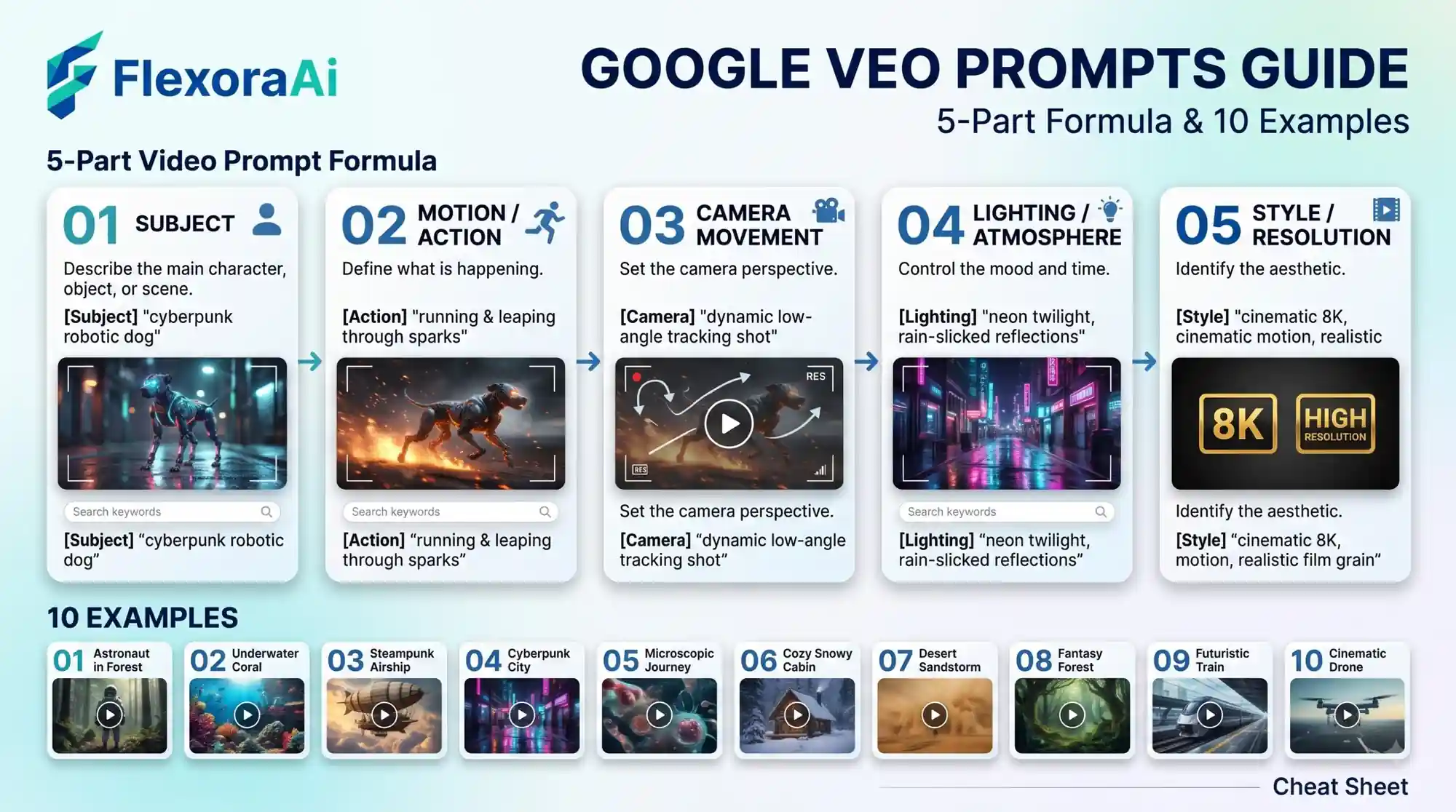
Writing a good video prompt is closer to briefing a cinematographer than typing a search. You decide the shot, the subject, what happens, where it happens and how it feels, and you can add sound. This guide, part of our Google AI tools guide, explains Google's five-part Veo formula, shows ten prompts you can adapt, and lists the mistakes that waste your generations.
Short answer: Start with the camera, then the subject, the action, the setting and the mood: cinematography + subject + action + context + style. Add sound separately, keep dialogue short enough for an 8-second clip, and describe what's in the scene instead of what you want to avoid.
Worth knowing
- Google's Veo 3.1 guide recommends a five-part order, and the camera comes first.
- Clips are short, so aim for one shot with one action.
- Veo creates synchronized audio, so say what the scene should sound like.
The five-part formula
| Part | What to write | Example |
|---|---|---|
| Cinematography | Shot type, camera move, lens | Slow dolly-in, medium close-up, shallow depth of field |
| Subject | Who or what is on screen | A baker with flour on her apron |
| Action | One clear thing happening | pulls a loaf from a brick oven |
| Context | Place, time, weather | in a small village bakery at dawn |
| Style and ambiance | Look, light and mood | warm golden light, calm and nostalgic |
You don't need every part every time. But keeping the order makes results more predictable, and it makes it easier to change one thing at a time.
Add sound on purpose
Veo 3.1 generates audio together with the picture. If you say nothing, you get whatever the model guesses. If you want control, add a short audio line to the prompt.
- Dialogue. Write the speaker and the quote: A baker says, “Fresh bread, still warm.” Keep it short enough to fit in eight seconds, roughly twenty to thirty words at most.
- Sound effects. Add a line such as SFX: the crackle of a wood fire.
- Ambient sound. Add a line such as Ambient: soft birdsong outside.
Ten prompts to adapt
| Type | Prompt |
|---|---|
| Product shot | Slow orbit around a ceramic mug on a wooden table, steam rising, soft window light, calm morning mood. |
| Nature | Wide aerial shot gliding over a misty forest at sunrise, golden light through the trees, gentle birdsong. |
| Food | Close-up of honey drizzling onto warm pancakes, macro lens, warm kitchen light, SFX: soft drizzle. |
| Travel | Handheld shot walking through a lively night market, lanterns glowing, crowd chatter in the background. |
| Character | Medium shot of an old watchmaker looking up from his bench, he says, “Time is patient.” Warm lamp light. |
| Sports | Low-angle slow motion of a runner crossing a finish line, confetti falling, crowd cheering. |
| Animation | A paper boat sailing down a rainy street gutter, whimsical stop-motion style, soft piano music. |
| Science | Time-lapse of a sunflower opening in a sunlit garden, macro lens, gentle ambient hum. |
| Fashion | Tracking shot of a model in a red coat walking through a snowy street, cinematic, quiet footsteps. |
| Education | Clean overhead shot of hands folding an origami crane, bright even light, soft instrumental music. |
Prompting skills carry across tools, and they sit beside the playful tricks in our complete list of Google Easter eggs.
Common mistakes
- Too many events. One action per clip works best.
- Long dialogue. It can break lip-sync and run out of time.
- Listing what you don't want. Describe the scene you do want.
- Vague characters. If someone must look the same across clips, use reference images.
- Changing everything at once. Edit one element at a time so you learn what works.
A simple workflow
- Write the one-sentence idea.
- Expand it with the five parts.
- Add an audio line.
- Generate once and note what's wrong.
- Change one thing and generate again.
Where to use Veo
Google offers Veo through several of its products, including the Gemini app, Flow and developer tools. Access, limits and prices change, so check the plan you have. Generated videos carry Google's watermarking, and you're responsible for the rights to anything you upload as a reference, including people's faces.
Compared with other video tools
Other tools such as OpenAI's Sora and Runway take different approaches to prompts and audio. The five-part structure is useful on all of them, but check each tool's own guide.
If you're choosing a video tool, our compare AI tools page can help you shortlist.
How we checked this: We used Google Cloud's ultimate prompting guide for Veo 3.1 from October 2025 for the formula and audio features, plus several 2025 and 2026 guides for clip lengths, dialogue limits and workflow advice. Veo versions and limits change. AI products change quickly, so check dates and your own screen before you rely on any detail. If something here is out of date for you, email ownerflexora.ai@gmail.com and we will fix it.
Your turn: Pick one prompt from the table, change only the camera move, and generate it twice. Compare the shots.
The best video prompts are short on words and long on decisions.
More tricks to try
Want to master the chat side of Google's AI? The Gemini hidden features guide is next.