📝 AI Automation · Small Business · Education
What Is AI Automation
for Small Business?
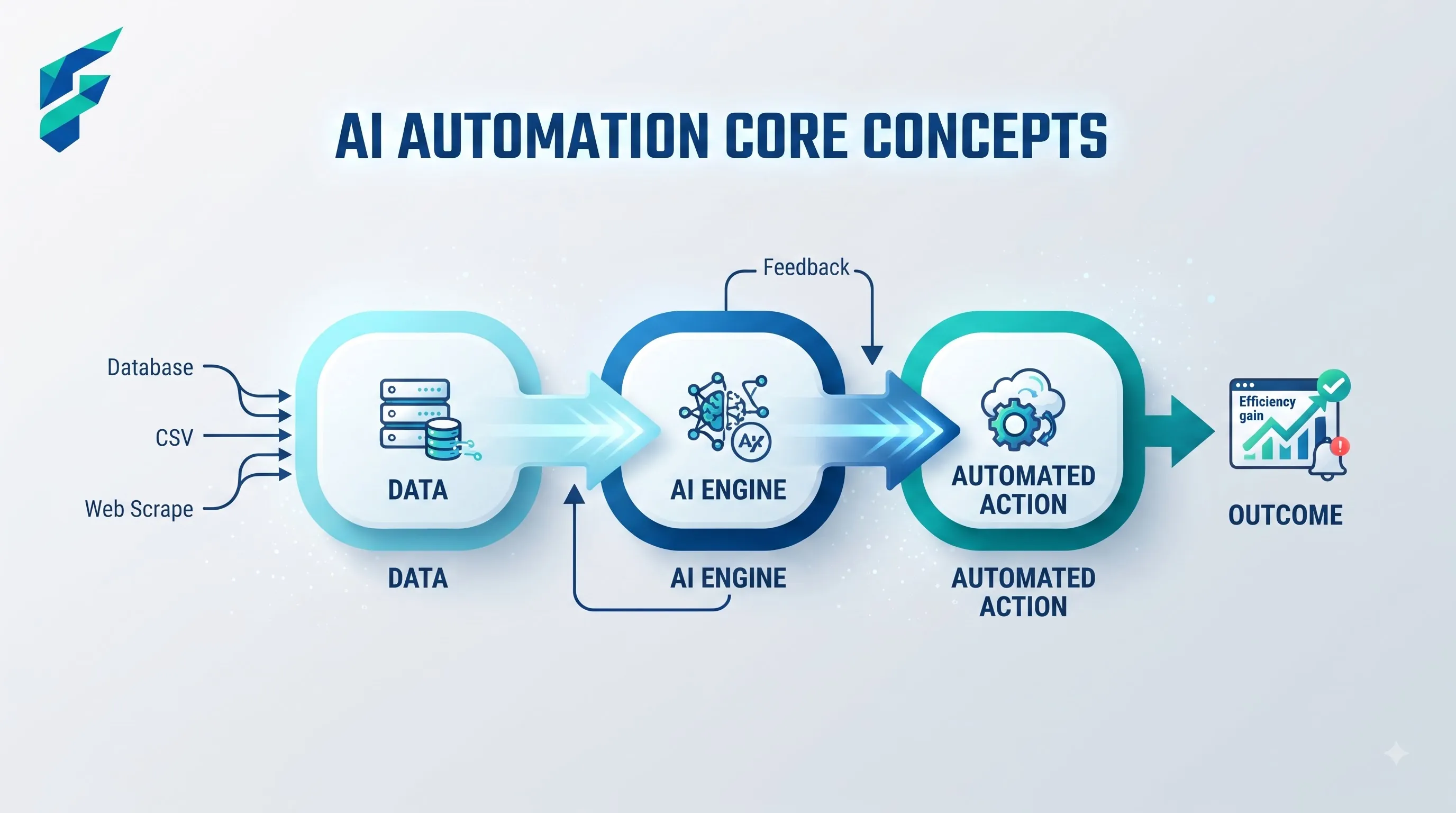
AI automation for small business is using AI to handle a task or a sequence of tasks without you doing them manually each time — not just using an AI tool once to write something, but setting it up so the work happens on its own, on a trigger, going forward.
That distinction matters more than it sounds like it should.
📍 Quick answer: Asking ChatGPT to write a customer email is using an AI tool. Setting up a system where a customer inquiry automatically gets read, categorized, and gets an AI-drafted reply waiting in your inbox before you even open it — that's automation. Same underlying AI, completely different level of setup and completely different payoff.
The difference between "using AI" and "AI automation"
Asking ChatGPT to write a customer email is using an AI tool. Setting up a system where a customer inquiry automatically gets read, categorized, and gets an AI-drafted reply waiting in your inbox before you even open it — that's automation. Same underlying AI, completely different level of setup and completely different payoff.
Most small businesses start at the first one and never get to the second, not because the second is impossible, but because nobody explains what it actually takes to get there.
✅ According to research: A recent SBA research spotlight on AI in small business found that small firms are rapidly closing the gap with larger enterprises in AI adoption — but most are still stuck at the "using AI tools" stage rather than implementing true automation workflows.
What AI automation looks like in practice
Customer service
A chatbot handles the routine questions — hours, pricing, order status — and only hands off to a person when something's actually complicated. No manual triage required.
Content
A workflow pulls your latest blog post, drafts three social captions from it, and queues them for your review — instead of you doing that repurposing by hand every time you publish. This is exactly what we cover in our guide on how to build a full content pipeline with free AI tools.
Admin
An incoming invoice gets read, the data gets pulled out automatically, and it lands in your bookkeeping software categorized and ready for review — instead of someone retyping numbers from a PDF. Our breakdown of AI form filling automation tools covers this exact use case.
I automated our client onboarding emails last quarter. New client fills out a form → their info gets categorized by service type → a personalized welcome email gets drafted with their specific details → it sits in my drafts folder for a final review before sending. Used to take me 15 minutes per client, now it's 2 minutes of review. That's 6-8 hours saved per month with about 20 new clients.
💡 Hiring automation: If you're recruiting, check out our guide on AI tools for writing job listings to see how automation can handle the repetitive parts of your hiring process.
What it takes to actually set one up
Three things, in order:
- A trigger (something that starts the process — a new email, a form submission, a schedule)
- The AI step itself (what gets read, written, or decided)
- A connection between the tools involved (usually through a no-code automation platform like Zapier or Make, or built-in integrations)
The AI part is usually the easy piece. The trigger-and-connection part is where the actual setup work is, and it's the part most "AI automation" content skips over because it's less exciting to explain.
Where this genuinely saves time
Repetitive, rule-based, high-volume tasks. If you're doing the same thing more than a handful of times a week — sorting emails, drafting similar responses, moving data between two tools — automation pays off fast. The setup time gets recovered within a few weeks for anything you do daily.
Where it doesn't help, and can actively hurt
Anything requiring judgment on a case-by-case basis. Automating customer complaints without a clear human handoff point is how businesses end up with an angry customer stuck in a bot loop. Automate the routine 80%, keep a person in the loop for the rest — that split is where the real ROI lives, and skipping the human handoff is the most common way small businesses get burned by this.
I learned this the hard way when I tried to automate our support ticket categorization without building in an escalation path. We ended up with three frustrated customers who couldn't get past the automated system. Now every automation I build has a clear "hand off to human" trigger — usually based on keywords like "urgent," "complaint," or "speak to someone."
📚 New to automation? If you're just getting started, our beginner's guide to AI tools for small business walks you through the basics before you jump into automation.
Is it worth it for a small business specifically?
Yes, for the routine stuff — but the honest bar is lower than the hype suggests. You don't need an "AI strategy." You need to notice the two or three tasks eating the most time every week and automate those first. Most small businesses that get real value from this started with one workflow, not a company-wide overhaul.
🚀 Ready to start? Pick one repetitive task you do this week — maybe it's responding to common customer questions or posting to social media — and try automating just that. If you need help choosing tools, head to our Tool Finder to explore automation options by category.