❄️ Google Search Tricks · Seasonal Fun
Google Let It Snow
Trick
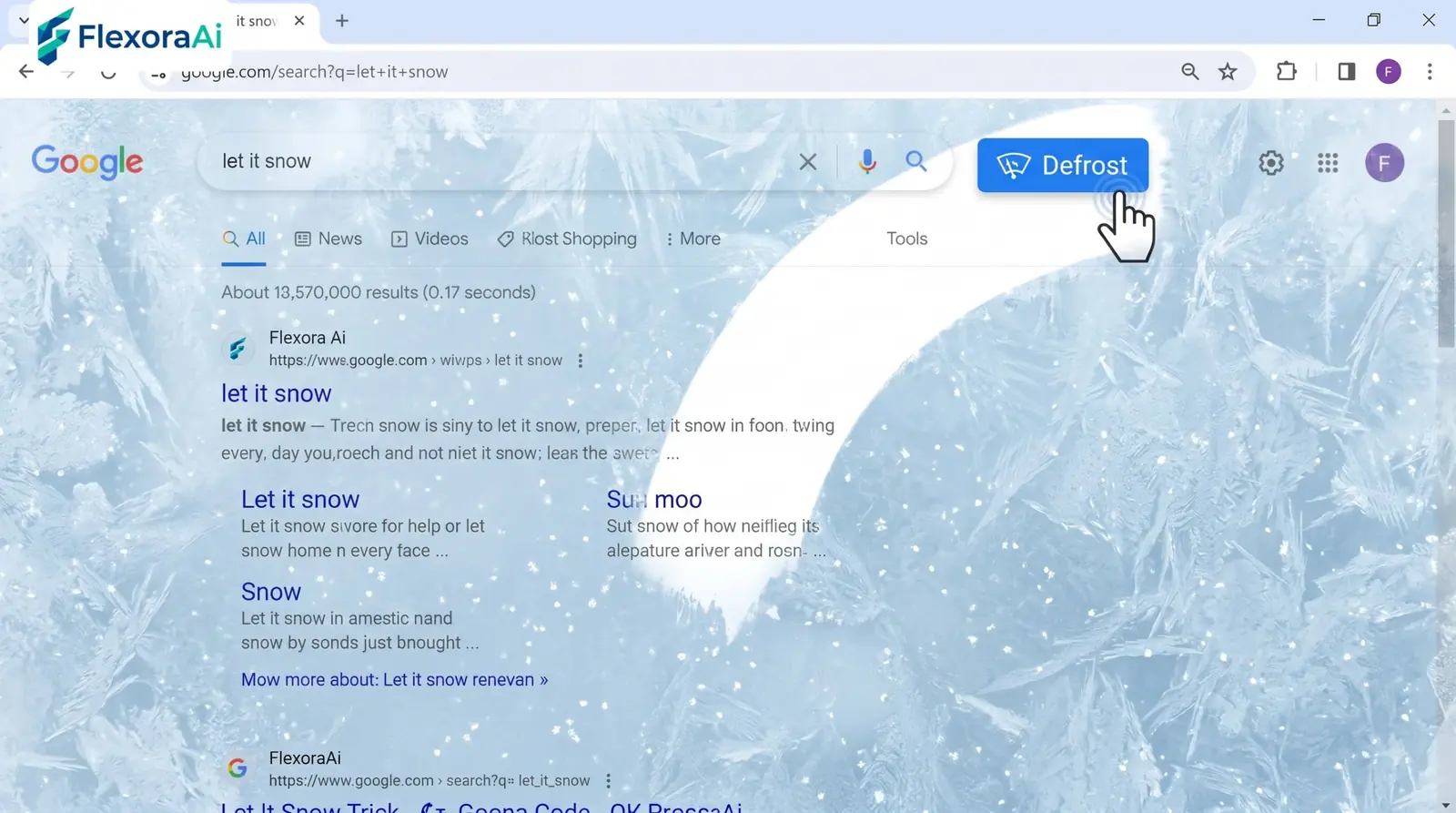
Few Easter eggs match the mood of a cold evening like this one. Type three words, and the screen fills with falling snow, then slowly frosts over until you wipe it clear. It's a lovely seasonal entry in our Google search tricks list, with a catch: it may not show up when you try it. This guide explains why.
Short answer: Search for let it snow on Google. Snow falls across the page, frost builds on the screen, and you clear it with the Defrost button. It's a seasonal trick, so it may not appear outside winter.
Worth knowing
- Snowflakes fall, then frost builds on the screen.
- A Defrost button clears it.
- It's seasonal, and guides disagree on whether it's still available.
How to try it
- Open Google in a desktop or mobile browser.
- Search for let it snow.
- Watch the snow fall and the frost build.
- Click Defrost, or wipe the screen, to clear it.
❄️ Try it here: Click the button below to see the same snow-and-frost effect right on this page — no Google needed.
Interactive Demo
Copy the code below and paste it before the </body> tag of any HTML page. No library needed. Works on any site.
<!-- Snow Effect by Flexora.Ai — flexora-ai.github.io -->
<canvas id="fx-snow" style="position:fixed;top:0;left:0;width:100%;height:100%;pointer-events:none;z-index:9999;"></canvas>
<script>
(function(){
  var c=document.getElementById('fx-snow'),ctx=c.getContext('2d'),W,H,flakes=[],frost=0;
  function resize(){W=c.width=innerWidth;H=c.height=innerHeight;}
  function init(){flakes=[];for(var i=0;i<140;i++)flakes.push({x:Math.random()*W,y:Math.random()*H,r:Math.random()*2.4+0.6,s:Math.random()*1.1+0.3,d:Math.random()*.5-.25,o:Math.random()*.5+.5});}
  function draw(){
    ctx.clearRect(0,0,W,H);
    for(var i=0;i<flakes.length;i++){var f=flakes[i];ctx.beginPath();ctx.arc(f.x,f.y,f.r,0,Math.PI*2);ctx.fillStyle='rgba(255,255,255,'+f.o+')';ctx.fill();f.y+=f.s;f.x+=f.d;if(f.y>H){f.y=-4;f.x=Math.random()*W;}if(f.x<0)f.x=W;if(f.x>W)f.x=0;}
    frost=Math.min(frost+.0006,.55);
    var g=ctx.createLinearGradient(0,H*.4,0,H);g.addColorStop(0,'rgba(200,230,255,0)');g.addColorStop(1,'rgba(200,230,255,'+frost+')');
    ctx.fillStyle=g;ctx.fillRect(0,0,W,H);
    requestAnimationFrame(draw);
  }
  window.addEventListener('resize',function(){resize();init();});
  resize();init();draw();
})();
</script>
✅ Free to use on any website · ✅ No sign-up · ✅ No external scripts · ✅ Works on mobile
Where it came from
The effect arrived as a holiday Easter egg about a month after the do a barrel roll trick. When it launched, Google explained that it worked in browsers that support canvas, part of the then-new HTML5 standard. That was a small showcase of what browsers could now do without plugins.
Google's help page for the holidays has also shown small decorations next to the search bar for events like Christmas, Hanukkah and Kwanzaa, though those details change from year to year.
Why it may not show up
| Possible reason | What to try |
|---|---|
| It's off-season | Try again in winter |
| Google has retired it | Check recent guides for a current status |
| An extension is interfering | Disable extensions for a test |
| Your browser is old | Use a current browser |
Guides disagree. Some list the trick as retired, while a late-2026 roundup says Google tends to switch it on in winter only. We'd treat it as a seasonal extra and not count on it.
It's the sort of fleeting surprise our complete list of Google Easter eggs tries to record while it lasts.
How it works, simply
The page draws many small white shapes on a layer above the results, moves them slightly every frame and adds a translucent frost layer that thickens over time. Wiping the screen erases parts of the frost layer. It's the same kind of animation that powers many web games.
Tips
- Try it at night. Dim rooms make the effect more atmospheric.
- Go full screen. More space means more snow.
- Show a child. It's a gentle way to introduce Easter eggs.
- Try in winter. That's when it's most likely to be on.
For more nostalgic seasonal fun, see our retro Google tricks guide.
Anatomy of a snow effect
- Particles. Hundreds of small shapes, each with its own size and speed.
- Drift. A slight sideways wobble that makes the snow look natural.
- Recycling. When a flake leaves the bottom, it returns to the top.
- Frost layer. A soft white overlay that grows over time.
- Wipe interaction. Your mouse or finger clears part of the overlay.
It's a good model for anyone learning animation on the web, because every part is simple, and the whole feels rich.
Why seasonal tricks work
A trick that appears only at the right moment feels like a gift. It also keeps Search from becoming cluttered, which matters to a product used billions of times a day. Seasonal surprises give people a reason to try a familiar search again, and to tell someone else about it.
Motion and comfort
Falling snow is gentle for most people, but anyone sensitive to motion may find it distracting. If that's you, use the Defrost button or skip the trick. Modern devices also let you ask apps for less motion in your settings.
How we checked this: We used a Fox News report on the launch for the canvas requirement and the timing, a recent roundup for the seasonal note, and Google Easter egg lists for the Defrost button. Sources disagree on whether it's still available. If something here is out of date for you, email ownerflexora.ai@gmail.com and we will fix it.
Your turn: Try the search, then wipe away the frost with your mouse. How long can you keep the screen clear?
It won't work every time, and that's part of the charm. Some surprises are best caught in season.
More tricks to try
Want a trick for musicians? The Google metronome trick is next.
Frequently Asked Questions
For the original report, see Fox News' report on the launch.