↗️ Google Tricks · Askew · Search Phrases
Google Askew Trick
(Make the Page Tilt)
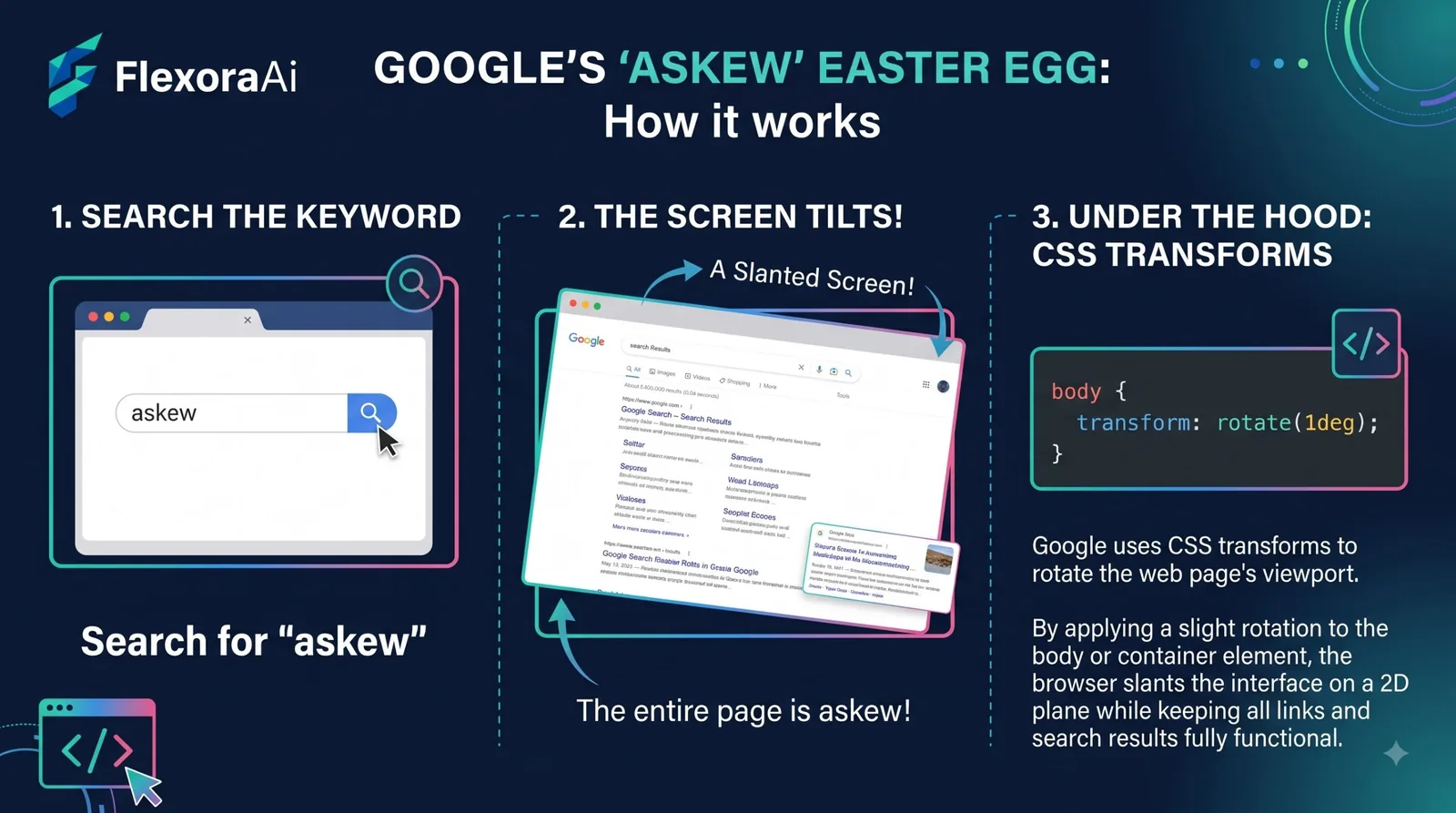
The quietest Google trick might also be the funniest. Search one word and the whole results page leans a few degrees, just enough to make you check whether your monitor is crooked. It doesn’t flash, spin or play a sound. It just sits there, slightly wrong.
This guide covers how to trigger it, how it relates to the older “tilt” trick, and how the effect works. It’s part of our Google search tricks list.
Quick answer: Search “askew” or “tilt” on Google and the results page leans slightly to the right. Search anything else and it snaps back. Reports say it needs a browser that supports CSS3 transforms, and a tech blog spotted the tilt version on smartphones in April 2011. Recent roundups list askew as still working.
How to try the Google askew trick
- Open google.com in a desktop browser.
- Type
askewand press Enter. - Look at the results page. It should lean a little to the right.
- Run any other search and the page straightens itself.
That reset is part of the charm. The tilt only lasts for that one results page, so a new search puts everything back, and your bookmarks and settings never change.
Askew vs tilt
Two words trigger it, and they have slightly different histories. A Google tech blog noticed “tilt” on smartphones in April 2011, with readers pointing out that the same effect also showed up on a desktop through the mobile version of the page. Wikipedia’s list of Google Easter eggs now lists both “tilt” and “askew” as causing the results page to lean. A few of those commenters noticed it worked in Chrome but not in Firefox back then, which is a useful reminder that browser support was patchy in 2011.
| Phrase | What it does | Notes |
|---|---|---|
askew | Leans the results page slightly | Listed in recent roundups as working |
tilt | Same effect | First spotted on phones in April 2011 |
tilted | Reported to trigger the effect on phones in 2011 | Older report, test it yourself |
Why it works
The effect is a small rotation applied to the whole page, which is why write-ups say it needs a browser that supports CSS3 transforms. Browsers that can’t rotate elements simply show the normal page. We couldn’t find a launch date for askew itself, so we’ll skip guessing one.
Build your own askew effect
You can reproduce the lean on a page you control with two lines of CSS. It won’t work on google.com, but it’s a great way to see how little code the trick needs.
Change the angle to taste. Around one or two degrees looks crooked enough to bother you without looking broken. Remove the rule and everything snaps back, which is exactly what Google’s version does when you search again.
Using it for fun
A good askew trick is a prank, and the best pranks are kind ones. A few ideas:
- Run it on a friend’s screen and ask if their monitor has gone wrong.
- Show it in a presentation about browsers and CSS to make the point that effects like this are small amounts of code.
- Pair it with the page spin from Google’s barrel roll trick for a full set of party tricks.
If it won’t tilt
- Type exactly
askewortilt, with no extra words. - Use a desktop browser and regular Google Search.
- Check whether reduced motion is switched on.
- Try a different browser. Chrome is the safest bet.
The wordplay cousin of this trick is Google anagram, where the joke is in the spelling suggestion. For a page that moves much more, see Google pendulum trick, which explains why the swinging page you imagine mostly doesn’t exist. The rest of the status labels live in our complete list of Google Easter eggs.
Frequently asked questions
Search “askew” or “tilt” on regular Google Search in a desktop browser. The results page leans slightly to the right, and any other search straightens it.
Recent roundups list askew as working. Google can change the results page at any time, so test it yourself on a desktop browser.
The tilt applies only to that results page. When you run another search, Google loads a fresh page without the effect.
Both phrases lean the page. A Google tech blog spotted “tilt” on smartphones in April 2011, and Wikipedia’s list of Google Easter eggs lists both phrases.
The tilt version was first spotted on smartphones in 2011. Current behavior can vary, so try both a phone and a desktop browser.
Yes. A CSS rule such as transform: rotate(1.5deg) on the html element tilts a page you control. It will not work on google.com.
Sources checked
Facts here were checked against these sources on November 2, 2026. Gameplay and settings were not tested for this article, so try anything yourself before relying on it.
- Wikipedia, List of Google Easter eggs — askew and tilt, and the CSS3 transform requirement.
- Entrepreneur, “The definitive list of Google search Easter eggs” — the next search straightening the page.
- Google System blog, April 2011 — the tilt trick spotted on smartphones.
- Search Engine Journal and ChromeStory — recent confirmation that askew is listed as working.
A clear walkthrough: Search Engine Journal’s Google Easter eggs guide, with askew and many more.